Insights
Insights turns recorded work into figures you can compare over time and between hotels. Its tabs sit in one row: Summary, Work, Locations, Equipment, People, Plans, Costs, Monthly and Logbook. On a phone the row scrolls sideways.
An example
The last 90 days of one hotel might read like this:
This hotel, Summary, last 90 days
- Created
- 187, ▲ 16 on the 90 days before
- Completed
- 176, ▲ 18 on the 90 days before
- Open now
- 28
- Overdue now
- 6
When it helps: when more work is created than completed, period after period, open work is piling up.
The period
From Summary to Costs the tabs share one period: the last 7, 30, 90 or 365 days. Insights opens on the last 90 days. A figure of the period says how it moved against the period of the same length just before it, in green when the move is good and in red when it is not (more work created is neither).
Monthly has its own period, the last 12 months or the last 2 years. Each tab keeps its own choice while you move between the tabs and the Logbook.
The tabs
- Summary: Created and Completed in the period, Open now and Overdue now; work created and completed over the period; Open work by status; and the plans' Preventive checks, On time, Late or Missed, as the logbook records them.
- Work: Created, Completed, Completed on time and Time to complete, which counts corrective work only; the Work type and Priority of the work created; Open work by status; and the work Open the longest.
- Locations: the Locations with work, the one with Most work and Most corrective work, the Locations with open work; work by Location and by Floor; and a table of each location's work orders, corrective work, open work and recorded costs.
- Equipment: Equipment with work, Most corrective work, Recorded downtime and Equipment in poor condition; work by Equipment category; Equipment with repeated corrective work; and a table of each piece of equipment.
- People: People and companies with work, Completed, Completed on time and the open work nobody is assigned, Unassigned now; and who the completed work was Assigned to.
- Plans: Checks due, Done on time, Late and Missed; the checks Missed or late, newest first; and a table of each of the Maintenance plans.
- Costs: Total cost, the contracts' fees for the period plus the costs of the work orders completed in it, with how many of those work orders have costs ("3 of 5 work orders have costs"); its parts, Labor, Parts, External service and Contract fees, with how many of the contracts running in the period have a value ("4 of 5 contracts have an annual value"); the total over the period; and the work's costs by Equipment category and the Highest, the costliest work orders completed in the period.
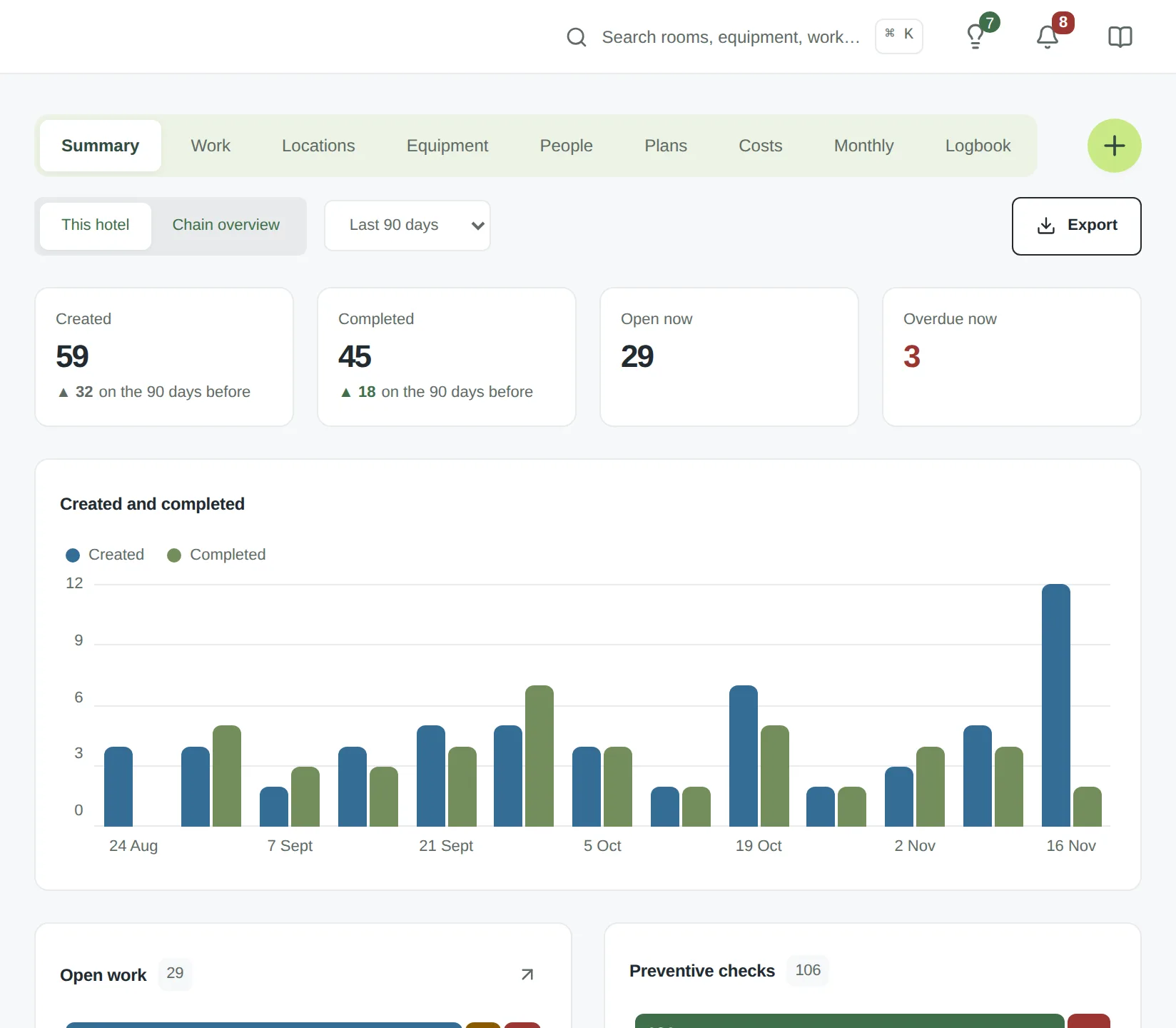
Open now and Overdue now count what the Work list counts as open work and overdue, readings included. A work order on several locations or pieces of equipment counts once in the figures, and once at each of its places in Locations and Equipment. Choose a row to open its record. A card with an arrow opens the Work list showing the same work.
Monthly
Monthly compares this month so far with the same days of last month: Created, Completed, Completed on time, Preventive checks on time and Total cost. Below, each of them month by month, and the Month by month table, newest first. The month in progress is drawn unfinished: a dashed line to a hollow point.
Chain overview
Choose Chain overview to add up the hotels whose Insights you can open, every tab alike. Summary then lists each hotel side by side. Open work is shown per 100 guest rooms, so large and small hotels compare fairly. A contract for several hotels counts whole in each hotel's row, and once in the chain's figures. The guest-room count comes from each hotel's profile. With one hotel, there is nothing to switch.
Reading the figures
- Only recorded data is counted. A cost or downtime nobody recorded is empty, not zero, and shows as a dash; a 0 is one somebody typed.
- A contract's fee counts for each day it runs: its Annual value (without VAT) × the days ÷ 365 (see Contract value). Work a contract covers is paid by its fee: leave that work order's costs empty, so nothing is counted twice. A cost on a work order is money on top of the contracts.
- The equipment and location breakdowns and an equipment's own costs are the work orders' alone: a contract's fee is not shared out among its equipment.
Export
Export downloads what the tab counts as a spreadsheet file (CSV): on Monthly, the Month by month table; on the other tabs, the work orders created in the period, of every hotel added up. On a phone it is the download icon. In the phone app the phone's share sheet opens instead, to save the file, send it or open it in another app; on an Android phone the file is also kept in the Downloads folder, as a browser keeps it (a second copy of the same name gets a number, such as (1)).
Logbook
Logbook prints the record of chosen maintenance plans over a period, as an inspector or your head office reads a maintenance book, for example the Legionella register.
- In Insights, choose the Logbook tab.
- Choose the plans with the search box and Filters, as in Maintenance plans. Saved filters work here too, from the list's title, Plans: a filter saved as "Legionella" on Maintenance plans chooses the same plans, and if it is your default, the logbook opens with it.
- Set From and To.
- Choose Print. Your browser prints it or saves it as a PDF; in the phone app, the phone's print window does. A PDF is named after the logbook's hotel and period, for example Logbook · Casa del Mar · 2026-01-01 – 2026-11-19.
Each plan has its own section, the yearly plans first and the daily ones last. Its columns are the plan's own readings and steps, so the logbook holds what your plans record: to add something to it, add it to the plan. Every date of the period is a row, including the ones missed or skipped; a plan on several locations or pieces of equipment has a row for each of them on each date. A value out of range, or an answer that asks for follow-up, is marked with ⚠, and the work it opened is named with its number and status.
Legionella – daily control, three days
| Date | Status | Done at | By | Tank temperature (°C) | Follow-up work |
|---|---|---|---|---|---|
| 9 Mar | Done | 08:40 | Mike | 62 | — |
| 10 Mar | Missed | — | — | — | — |
| 11 Mar | Done | 08:35 | Ana | 58 ⚠ | #214 Completed |
When it helps: the inspector sees every date, the missed ones too, without anyone copying values into a paper book.
Equipment costs
Each equipment record shows its own yearly summary of recorded costs, corrective orders and downtime. See Equipment.