Contracts
Contracts records your service contracts and warranties: who provides what, on which equipment, until when and for how much, and, for a service contract, the date by which you have to decide whether to continue.
An example
A yearly lift maintenance contract that renews unless you give two months' notice:
Lift maintenance
- Contract number
- EL-2026-014
- Provider
- Example Lifts, S.L.
- Our entity
- Example Hotel Operations, S.L.
- Point of contact
- Service desk, 900 000 000
- Services and response commitments
- Monthly preventive visit. A stopped lift is attended within 4 hours.
- Proposed scheduled maintenance
- Every month: preventive visit
- Starts
- 1 January
- Ends
- 31 December
- Automatic renewal
- Yes
- Notice period
- 2 months
- Decide by
- 31 October
- Annual value (without VAT)
- 4,800 EUR
- Covered equipment
- Lift 1, Lift 2
When it helps: if you want to change company, you have to say so by 31 October, and that date is easy to forget. FixInn warns you as it gets close. When a lift stops, the work order shows who covers it and who to call.
A warranty is simpler, for example: type Warranty, Provider Example Boilers, Covered until 30 June, on the main boiler.
The contract list
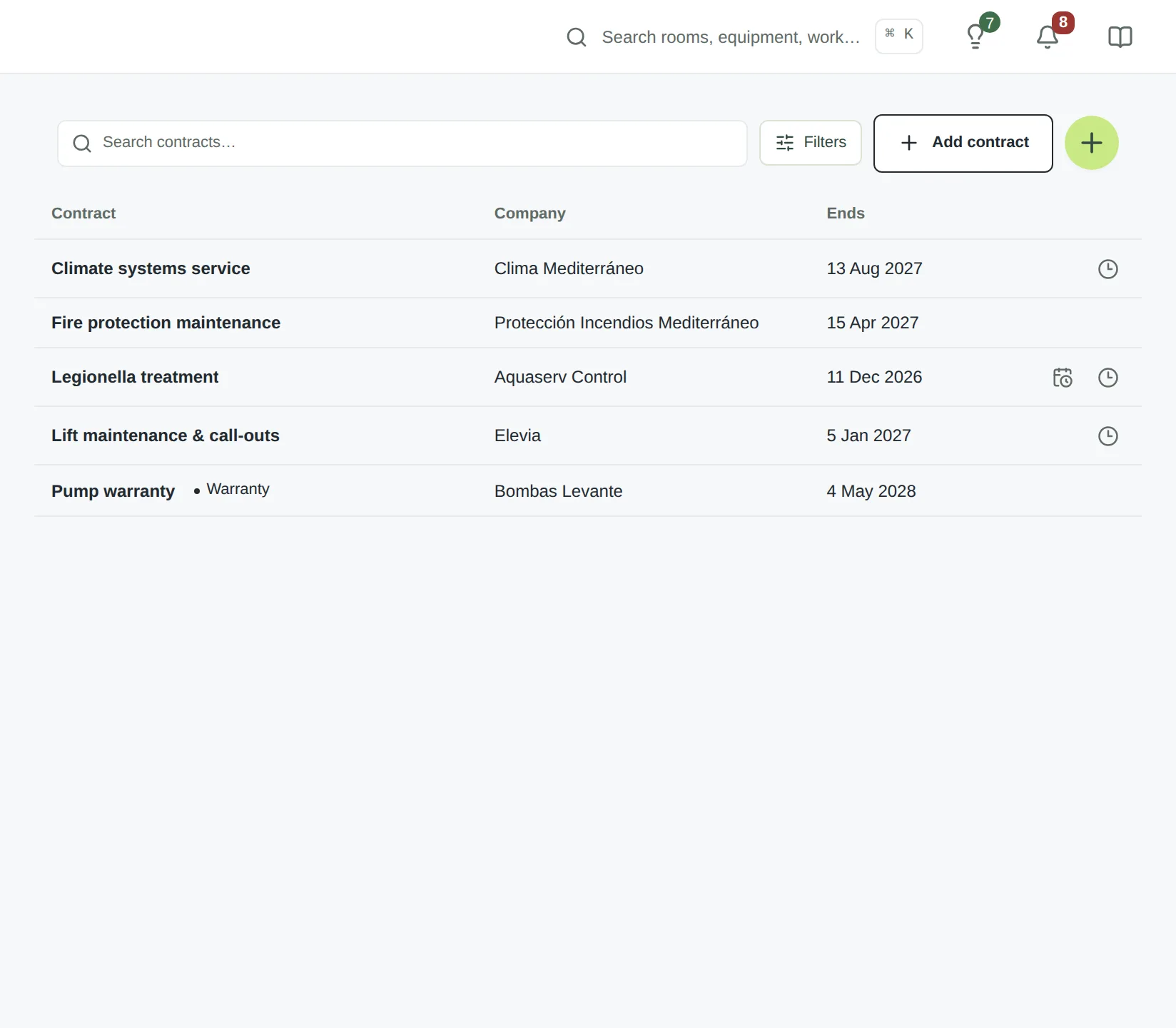
Each row shows the title, the company, the end date and warning icons. A contract that has no end date shows No end date. A warranty also shows a Warranty tag, and Filters shows only Service contracts or Warranties. Warnings flag terms that are ending, a date to decide by that is close, dates that still need checking against the contract, and contracts that have renewed by themselves.
Add a contract from a file
- Drop a contract file onto the Contracts page, or choose a file. A PDF, a scan or a photo all work.
- FixInn opens a new contract form with the file attached and reads it. This takes about a quarter of a minute.
- Check every field against the contract. Under the file, Passages from shows the sentence and the page each value comes from, and a list of what a reviewer should know, such as a missing annex.
- Choose Add contract. The new contract opens in the form's place; Back, or its ×, closes it.
How the reading works:
- FixInn reports what the contract says. When the contract does not state something, such as an end date, the field stays empty and says that it is not stated in the contract.
- FixInn calculates what the contract only implies, and says so under the field. The yearly value is the sum of the recurring fees you contracted: a quarterly fee counts four times, a one-off fee does not count. An end date is calculated from a term such as "one year from signing". When no start date is stated, the signing date is used.
- For a contract signed years ago that renews by itself, FixInn proposes the term it is in today.
- FixInn never saves on its own, and it never marks a date as checked.
If FixInn cannot read the file, the file stays attached and you can fill in the form yourself. On a contract you already saved, Autofill from contract fills only the empty fields and lists where the file says something different.
Add a contract by hand
- Choose Add contract.
- Attach the contract file if you have it.
- Enter the Title, keep the type Service contract, and choose the Hotels.
- Enter the Provider, Our entity and the Point of contact.
- Describe the Services and response commitments, and list the recurring visits under Proposed scheduled maintenance, one per line with how often.
- Enter Starts and Ends, tick Automatic renewal if it does, and enter the Notice period.
- Check the Decide by date.
- Enter the Annual value (without VAT) and the Price and payment terms.
- Choose the Covered equipment.
- Choose Add contract. The new contract opens in the form's place; Back, or its ×, closes it.
Provider and our entity
The Provider is the company on the other side, as the contract names it. Type its name. If it is in the Directory, choose it from the list and the contract is linked to that company. When FixInn reads a file, it links the provider on its own only when the tax identifier matches a company in the Directory; a similar name is never enough.
A provider that is not in the Directory stays as text, which is fine. Add company opens a new company with the name, tax identifier, email and phone that the contract gives; check them and save, and the contract is linked. Unlink goes back to text.
Our entity is the company on your side that signs. It often does not carry the hotel's name, and a chain may sign through several. FixInn suggests the entities your other contracts already use.
Provider signatory and Our signatory record who signed and in what capacity. The Point of contact is who you call or write to about the service, which is rarely the person who signed: write a name, a department, phones and email addresses in any mix.
The date to decide by
Every contract with an end date has a date before it by which you have to act. Decide by holds it:
- If the contract renews automatically, it is the last day to tell the provider that you will not renew: the end date less the Notice period. A notice period of 0 means you can tell them until the end date.
- If it does not, or no notice period is recorded, it is when to start arranging the renewal: 60 days before the end.
FixInn calculates the date and keeps it up to date while you change the term. Change it by hand if you want another date. Tick Decide-by date checked against the contract after a person has read the clause; until then, FixInn shows the date as not yet checked and sends no reminder. FixInn never sends a notice to a company.
Contracts with no end date
Many service contracts run until someone ends them. Leave Ends empty. The contract never shows as expired, has no date to decide by, and covers its equipment from its start date. You can still record the Notice period the contract asks for.
When a contract has renewed
A contract that renews automatically keeps the end date of the term you recorded. Once that date has passed, FixInn does not assume the renewal: it asks. Open the contract and choose Confirm renewal to move it to the term it is in now, with a new date to decide by. Each renewal lasts (months) sets the length of that term; a year is used when the contract does not say. If the contract was cancelled instead, untick Automatic renewal and save.
Contract value
Annual value (without VAT) is what the contract costs in a normal year: one total for the contract, even when it covers several hotels. Price and payment terms holds the rest: one-off and hourly charges, how prices are revised and how the contract is paid.
The contract's payments belong to the contract. Insights adds its fee to the hotel's costs for every day it runs: the annual value × the days ÷ 365, from its start date to its end date, or on past the end while it renews automatically. So work the contract covers records no cost of its own: leave its costs empty. A cost on a work order is what was paid on top of the contract. A contract for several hotels counts whole in each of them, and once when they are added up. Leave the annual value empty when you do not know it; a warranty has none.
Warranties
A warranty is a promise from a company, usually the manufacturer or the installer, to fix defects in specific equipment until a date. FixInn keeps it as a contract of type Warranty, with no renewal, notice or price.
You rarely need to start from this page:
- When you add equipment, tick Record a warranty, choose the Warranty provider and enter Covered until. Length (years) fills the end date from the start date.
- On an equipment record, choose Add warranty next to Warranty. Once added, the warranty opens; closing it returns to the equipment.
- Here, choose Add contract and the type Warranty.
Attach the invoice or warranty card so the proof is at hand when you claim. Use Conditions for what the warranty covers or requires, such as parts only, or a yearly service. Equipment can have more than one warranty, for example parts from the manufacturer and labour from the installer. A warranty warns only when its term is ending or has ended.
Plans from a contract
Proposed scheduled maintenance lists the work a contract does again and again, or that a warranty requires of you to keep its cover: one line each, with how often, such as "Every 3 months: legionella sampling". Reading a contract file fills it in with only what the contract states with a frequency; call-outs and response times stay under Services and response commitments. Change it as you like.
When it lists something, Add plans shows under it. It opens the Assistant, which lists each item, says which ones a plan of yours already covers, asks what it needs (where, when the next visit is, who is responsible, whether a certificate must be kept) and prepares the plans as cards for you to accept. Each plan's instructions end with the contract it comes from. Changing the contract later does not change those plans.
Where contracts show up
A work order and an equipment record show the contracts and warranties that cover its equipment, with the contract's point of contact; a phone number or an email address in it can be tapped. A technician sees an icon on the work when a warranty covers the equipment that day.